Integrate to your GitHub Actions
It is easy to integrate Roborazzi to your GitHub Actions.
Add a job to store screenshots
name: store screenshots
on:
push
env:
GRADLE_OPTS: "-Dorg.gradle.jvmargs=-Xmx6g -Dorg.gradle.daemon=false -Dkotlin.incremental=false"
jobs:
test:
runs-on: macos-latest
steps:
- uses: actions/checkout@v4
- uses: actions/setup-java@v4
with:
distribution: 'zulu'
java-version: 19
- name: Setup Gradle
uses: gradle/actions/setup-gradle@v4
- name: test
run: |
# Create screenshots
./gradlew app:recordRoborazziDebug --stacktrace
# Upload screenshots to GitHub Actions Artifacts
- uses: actions/upload-artifact@v4
with:
name: screenshots
path: app/build/outputs/roborazzi
retention-days: 30
Add a job to verify screenshots
name: verify test
on:
push
env:
GRADLE_OPTS: "-Dorg.gradle.jvmargs=-Xmx6g -Dorg.gradle.daemon=false -Dkotlin.incremental=false"
jobs:
test:
runs-on: macos-latest
steps:
- uses: actions/checkout@v4
- uses: actions/setup-java@v4
with:
distribution: 'zulu'
java-version: 19
- name: Setup Gradle
uses: gradle/actions/setup-gradle@v4
# Download screenshots from main branch
- uses: dawidd6/action-download-artifact@v6
with:
name: screenshots
path: app/build/outputs/roborazzi
workflow: test.yaml
branch: main
- name: verify test
id: verify-test
run: |
# If there is a difference between the screenshots, the test will fail.
./gradlew app:verifyRoborazziDebug --stacktrace
- uses: actions/upload-artifact@v4
if: ${{ always() }}
with:
name: screenshot-diff
path: app/build/outputs/roborazzi
retention-days: 30
- uses: actions/upload-artifact@v4
if: ${{ always() }}
with:
name: screenshot-diff-reports
path: app/build/reports
retention-days: 30
- uses: actions/upload-artifact@v4
if: ${{ always() }}
with:
name: screenshot-diff-test-results
path: app/build/test-results
retention-days: 30
Advanced workflow Sample: Compare Snapshot Results on Pull Requests
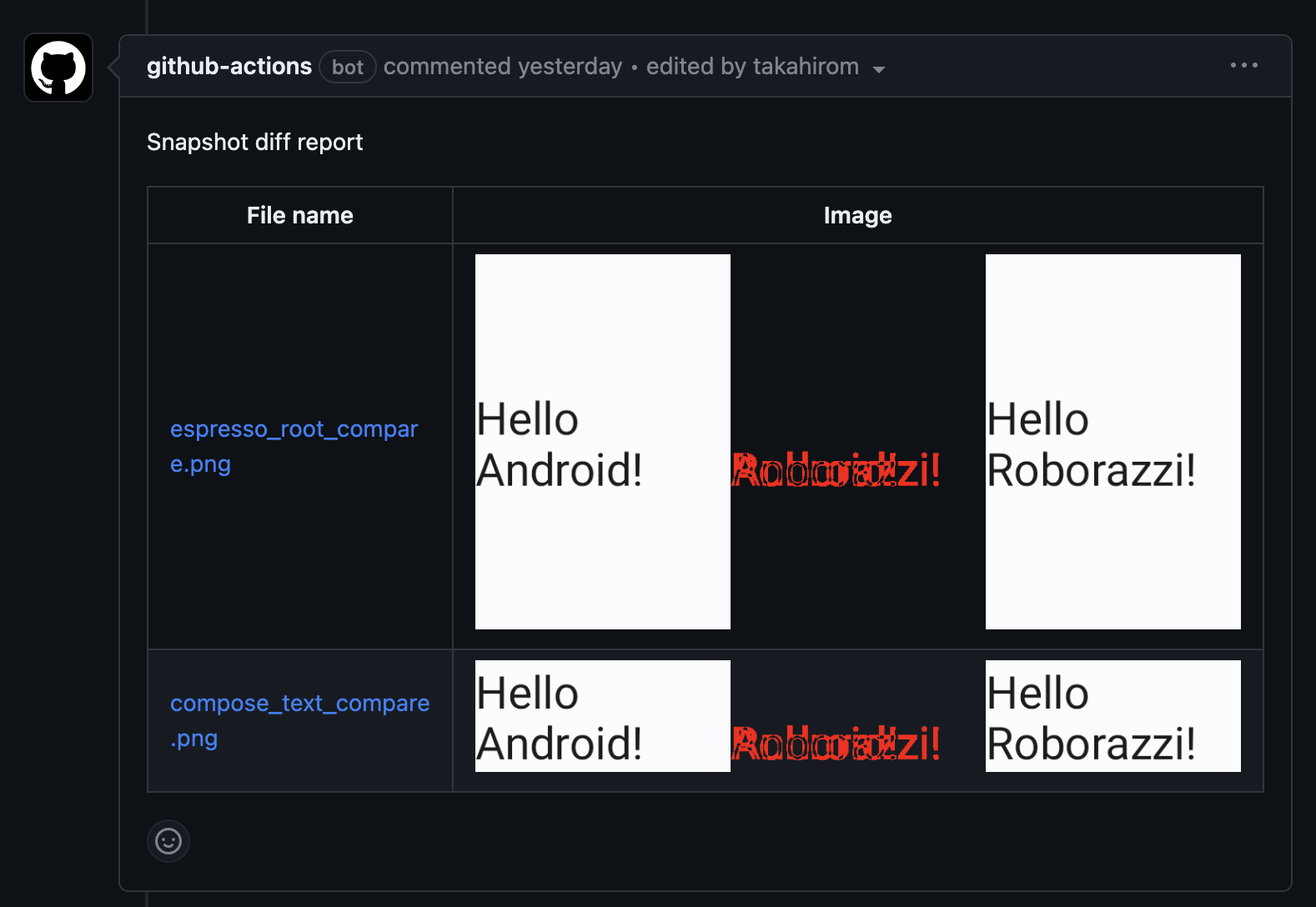
For those who are looking for a more advanced example, we have prepared a sample repository that demonstrates how to use Roborazzi to compare snapshot results on GitHub pull requests. This sample showcases the integration of Roborazzi with GitHub Actions workflows, making it easy to visualize and review the differences between snapshots directly in the pull request comments.
Check out the roborazzi-compare-on-github-comment-sample repository to see this powerful feature in action and learn how to implement it in your own projects.
Example of the comment
Last modified: 22 October 2026